Keep your novel
in one place.

Your outline and character notes sit beside your draft. Author’s Blueprint gives you one desktop workspace to plan scenes, write chapters, and review the manuscript.

Windows · Mac with Apple silicon3 personal devicesNo subscription

Not the right fit? Request a refund within 14 days.

US customers only. These early releases are unsigned and may show a security warning. Check installation requirements.
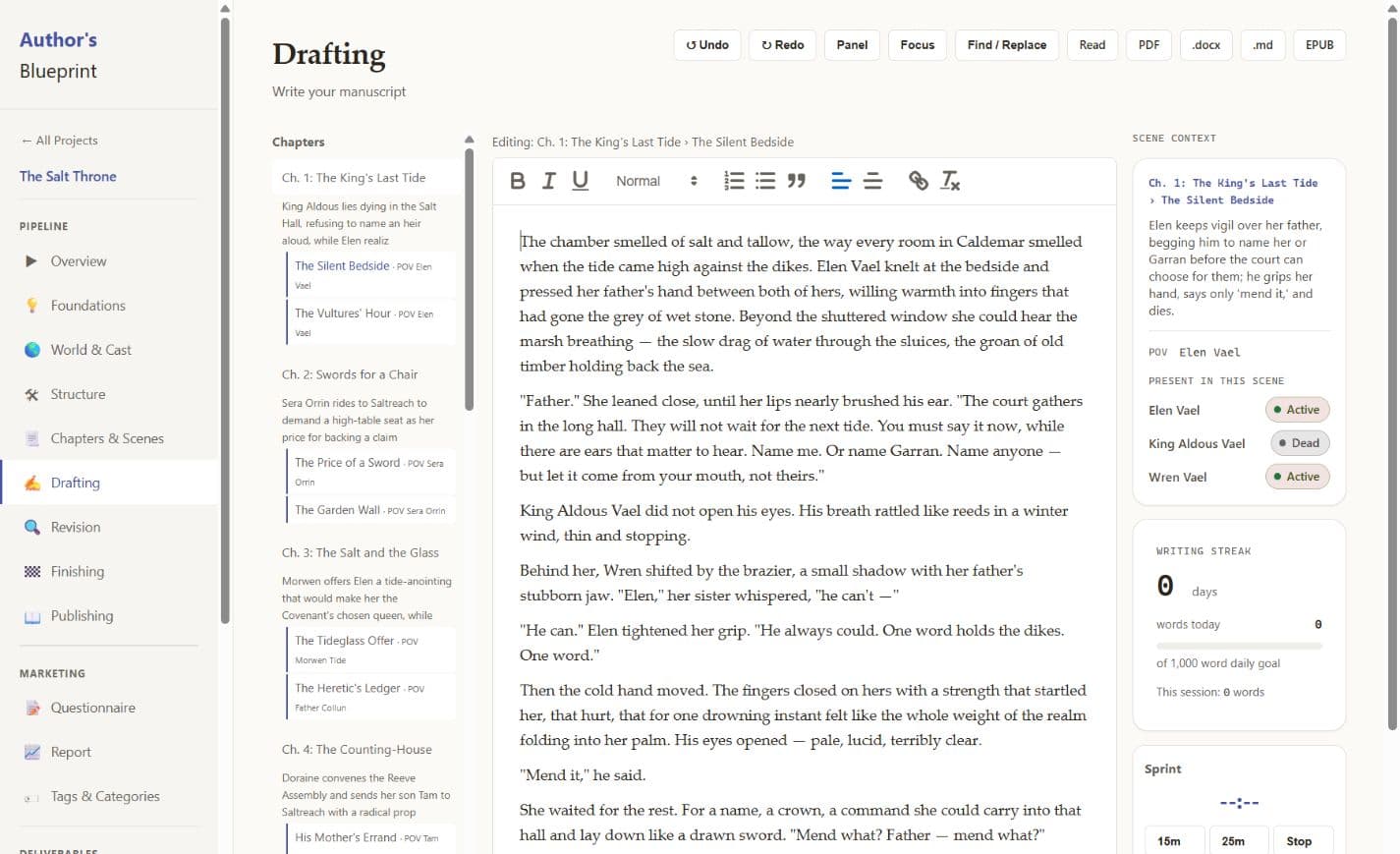
The Author’s Blueprint editor showing the manuscript, chapters, and scene context
The current app, with our sample novel, The Salt Throne.

Work on a scene.
See the whole story.

Follow the same sample novel from the Scene Board to the draft and manuscript report. Select a screen to take a closer look.

Plan screenshot

Choose Actual size to read the app’s details.

Scene Board showing the opening chapters of The Salt Throne as scene cards

Start with the outline you need

Choose from seven story frameworks, or work with your own chapter beats. Keep your outline close as the draft changes.

Keep track of your cast

Store character notes, locations, and factions with the project. Relationship maps and timelines help you follow the connections.

Keep a version you can return to

Take a manuscript snapshot before a revision. Back up your library, and keep a separate copy somewhere you trust.

Take your work with you

Export DOCX, PDF, EPUB, or Markdown. Use an ABP file to move the whole project, including its cast and planning notes, to another computer.

Your manuscript
stays yours.

Your writing and manuscript reports stay on your computer. Nothing is sent to an AI service. Add a passphrase to lock your writing vault, and keep your own backups.

An internet connection is needed for activation and periodic license checks, with up to 14 days offline between checks. Those checks do not include your manuscript.

Read the license details

Bring the draft you already have.

Import a Word document or paste your text. You can also start with a blank project and work out the outline as you go.

DOCX import keeps your text and paragraphs, but some formatting may need tidying. Keep your original file. To switch computers, export an ABP project and import it on the other device. There is no automatic cloud sync.

After payment clears, we’ll email your key and download instructions. Activate the app with that key to get started.

Already own it? Sign in
$47USD · pay once
  • Windows · Mac with Apple silicon
  • Up to three of your own devices
  • Bug fixes and minor updates included
  • Refunds within 14 days

US customers only. Both early releases are unsigned. Your computer may warn you or block the app. Read the installation guide before buying.

Buy for $47

Checkout opens in a new tab and shows SignalPoint, the company behind Craft & System. It asks for a US address for location and tax purposes. This is a digital download. Nothing is shipped.

A future major version may be a separate paid upgrade. There is no subscription.

Refund policy

Questions before you buy?

Where is it available to purchase?
Sales are currently limited to customers in the United States. Craft & System is a trade name of SignalPoint Systems LLC. Your bank statement may identify the payment as SIGNALPOINT.
What does the license include?
Pay $47 once and use the app on up to three of your own computers. Bug fixes and minor updates for your purchased version are included. A future major version may be a separate paid upgrade. There is no subscription.
Can I work offline?
Yes. Writing, planning, and manuscript reports run on your computer. You need internet access to activate the app and check your license periodically. You can work offline for up to 14 days between checks. After that, you can still read and export your work, but editing needs a successful license check.
Does AI read or write my manuscript?
No. Reports check for patterns in your manuscript using rules that run on your computer. Your writing is not sent to an AI service.
Can I move a project between computers?
Export a portable .abp project and import it on another device. The project, cast, and planning material travel together. There is no automatic cloud sync.
What can I import and export?
Import a DOCX manuscript or paste your text. Export DOCX, EPUB, Markdown, or PDF. Portable .abp files move individual projects, and an encrypted vault backup preserves your library.
What should I know before installing?
The app needs a license key for activation. The Mac build is for Apple silicon (arm64), including M-series Macs and the A18 Pro MacBook Neo. Intel Macs are not supported. Both early releases are unsigned, so your computer may show a security warning. Smart App Control or a managed computer may block installation. Read the installation guide before purchasing.
How do I get my key and downloads?
After Stripe confirms payment, we email your license key and download instructions. Sign in with the same email you used at checkout to access your account. Some bank payments take longer to clear. Craft & System is operated by SignalPoint Systems LLC, so checkout and your statement may show SignalPoint. The address is used for location and tax purposes. Nothing is shipped.
What if it isn’t right for me?
Email melvin@craftandsystem.com within 14 days of purchase to request a refund. Include your purchase email or order number.

Installing on a new computer? Read the installation guide for Mac and Windows.

Need something else? Contact the studio.

Ready to work on your book?

$47 once, for up to three of your own computers.